Project Description
Project information
- Category: JavaFx File Handling
- Programming Language: Java
- Project Type: Sole project
- GitHub URL: https://github.com/Isuranga-Seram/Media-Fun.git
Applications Used


🎵 Audio and Video Media Player
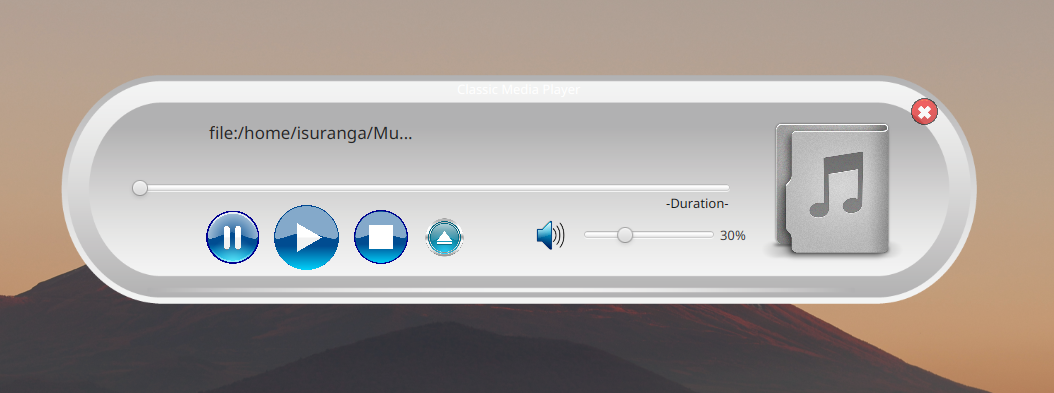
The Audio and Video Media Player is a versatile multimedia player that enables users to play both audio and video files. The application provides essential functionalities like play, pause, seek, volume control, file selection, and drag-and-drop support for a seamless user experience. Users can load various media formats, such as .mp3 for audio and .mp4 for video, and interact with the media through an intuitive and interactive interface.
🚀 Core Features:
- 🎶 Audio and Video Playback:
- Supports playback of common media formats like .mp3, .flv, .aac (audio) and .mp4, .avi, .mkv, .wav (video).
- Allows users to toggle between audio and video playback seamlessly.
- 📂 File Selection:
- Users can select media files using the built-in Open button.
- A file dialog allows users to choose audio or video files from their system for playback.
- ▶️ Play, Pause, and Stop Controls: Play button starts media playback, Pause halts it, and Stop resets playback.
- ⏳ Seek and Progress Bar:
- Seek Bar allows users to move through the media, skipping forward or backward.
- The media position updates in real-time during playback, allowing for accurate scrubbing.
- 🔊 Volume Control: The Volume Slider adjusts audio volume and displays current volume percentage.
- ⏱️ Duration Display:
- Shows the current playback time and total duration of the media.
- Automatically updates as the media plays, showing the elapsed time and total time.
- 📥 Drag-and-Drop Support: Users can drag and drop media files directly onto the media player interface for immediate playback.
The project is designed using JavaFX for building the graphical user interface (GUI) and Java's MediaPlayer class to handle media playback. This project can be used as a standalone application for both personal and educational purposes, and it demonstrates how to integrate video and audio functionalities within a desktop application.
🛠️ Technologies Used
- JavaFX: Used for creating the graphical user interface.
- Java Media Framework (JMF): Handles media file playback.
- FXML: Defines the UI structure.
- Event Handling: JavaFX event-driven model is used to manage user interactions, including button clicks, drag-and-drop actions, and media playback control.
🔑 Key Functionalities
📂 File Loading:
The user can load media files either by selecting the Open button and navigating through the file system or by dragging and dropping the media file onto the application window.
▶️ Playback Control:
- The user can start, pause, and stop media playback with easy-to-use buttons.
- The progress bar provides a visual representation of the current playback position.
⏩ Seek Control:
The Seek Bar allows users to jump to any point in the media by dragging the slider. The current playback time is updated as the user interacts with the seek bar.
🔊 Volume Control:
The volume can be adjusted by a slider, with the corresponding percentage value displayed on the screen.
📀 File Formats:
Supports common audio and video formats such as .mp3 (audio) and .mp4 (video), and can be extended to support more formats with the appropriate libraries.
Built With
Here are the major frameworks/libraries used to build up the application. Java language is used for the programming and the JavaFx and SceneBuilder are used for interface designing part.
💾 Installation
Clone the project and Run
                       git clone https://github.com/Isuranga-Seram/Media-Fun.git
                       cd Media-Fun
📦 Dependencies
To make the app works finely, I have to add some dependencies to the POM.xml file.
                        <dependencies>
                            <dependency>
                                <groupId>org.openjfx</groupId>
                                <artifactId>javafx-controls</artifactId>
                                <version>23</version>
                            </dependency>

                            <dependency>
                                <groupId>org.openjfx</groupId>
                                <artifactId>javafx-fxml</artifactId>
                                <version>23</version>
                            </dependency>

                            <dependency>
                                <groupId>org.openjfx</groupId>
                                <artifactId>javafx-media</artifactId>
                                <version>23</version>
                            </dependency>
                        </dependencies>
🎯 Usage
- 🎵 Personal Media Playback
- 📚 Educational Tool for Learning Media Playback
- 💾 Offline Media Player
- 💡 Audio and Video Testing Platform
🤝 Contributing
Developed and maintained as a solo project, from UI/UX design to coding, debugging, and deployment.
Get in touch
Have an idea for a project? Let’s turn it into reality! Contact me here, and let’s get started.Find Me
Email: isurangaseram@gmail.com
LinkedIn: linkedin.com/in/isuranga-seram
Tel: +94 71 8816464